<?xml version="1.0" encoding="utf-8"?><feed xmlns="http://www.w3.org/2005/Atom" ><generator uri="https://jekyllrb.com/" version="4.2.2">Jekyll</generator><link href="https://xcode.tips/feed.xml" rel="self" type="application/atom+xml" /><link href="https://xcode.tips/" rel="alternate" type="text/html" /><updated>2025-06-23T17:53:39+02:00</updated><id>https://xcode.tips/feed.xml</id><title type="html">Xcode Tips</title><subtitle>Collections of tips for Xcode.</subtitle><author><name>Dominik Hauser</name></author><entry><title type="html">Color Contrast Calculator</title><link href="https://xcode.tips/color-contrast-calculator/" rel="alternate" type="text/html" title="Color Contrast Calculator" /><published>2025-06-23T08:00:00+02:00</published><updated>2025-06-23T08:00:00+02:00</updated><id>https://xcode.tips/color-contrast-calculator</id><content type="html" xml:base="https://xcode.tips/color-contrast-calculator/"><![CDATA[<p><img src="../../../assets/67_color_contrast_calculator.jpg" alt="" /></p>

<!--more-->

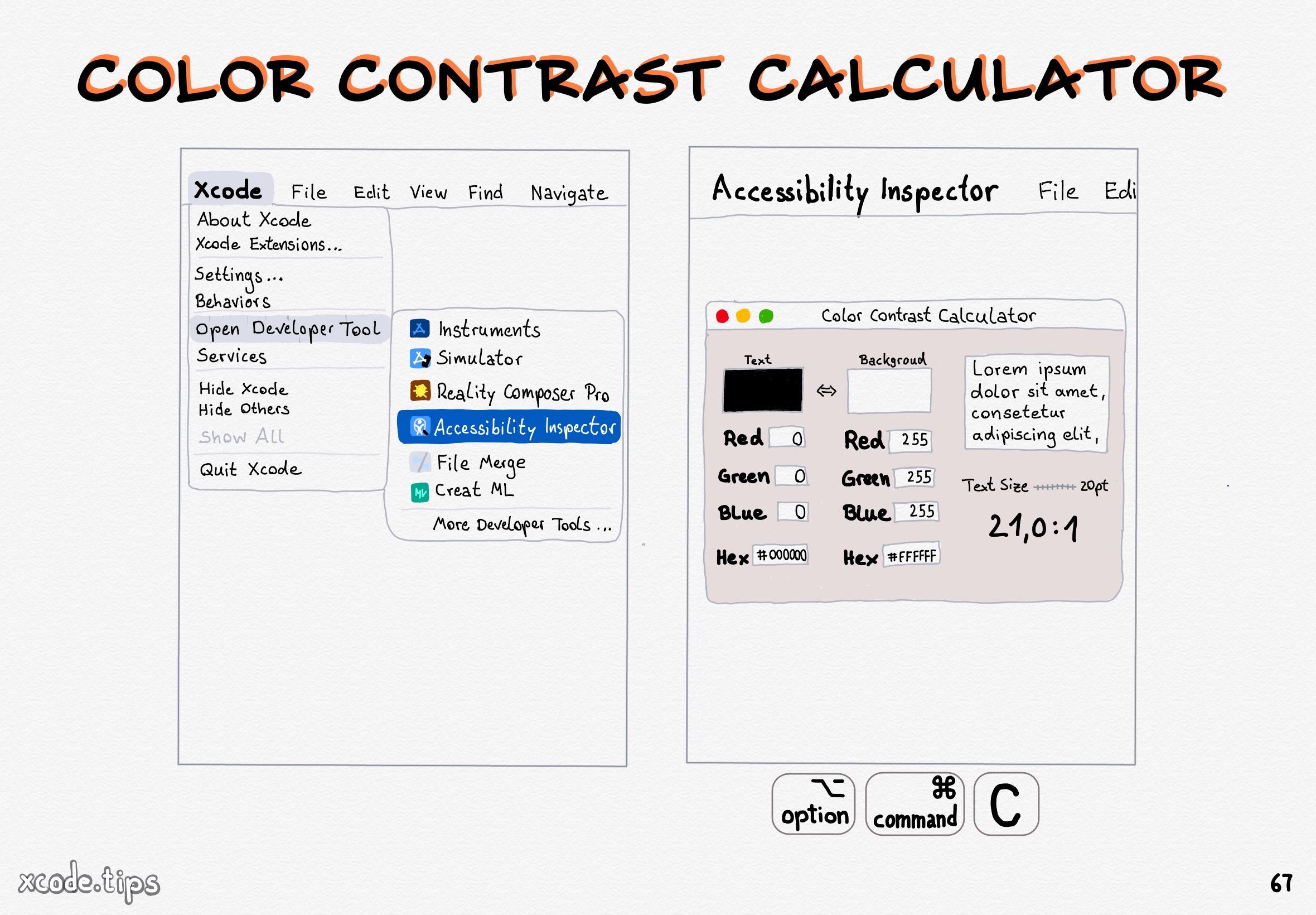
<p>The Accessibility Inspector comes with a color contrast calculator. Use the shortcut Option Command C
to open it.</p>]]></content><author><name>Dominik Hauser</name></author><category term="accessibility" /><category term="contrast" /><summary type="html"><![CDATA[]]></summary><media:thumbnail xmlns:media="http://search.yahoo.com/mrss/" url="https://xcode.tips/assets/67_color_contrast_calculator.jpg" /><media:content medium="image" url="https://xcode.tips/assets/67_color_contrast_calculator.jpg" xmlns:media="http://search.yahoo.com/mrss/" /></entry><entry><title type="html">Bookmark Search</title><link href="https://xcode.tips/bookmark-search/" rel="alternate" type="text/html" title="Bookmark Search" /><published>2024-08-12T08:00:00+02:00</published><updated>2024-08-12T08:00:00+02:00</updated><id>https://xcode.tips/bookmark-search</id><content type="html" xml:base="https://xcode.tips/bookmark-search/"><![CDATA[<p><img src="../../../assets/66_bookmark_search.jpg" alt="" /></p>

<!--more-->

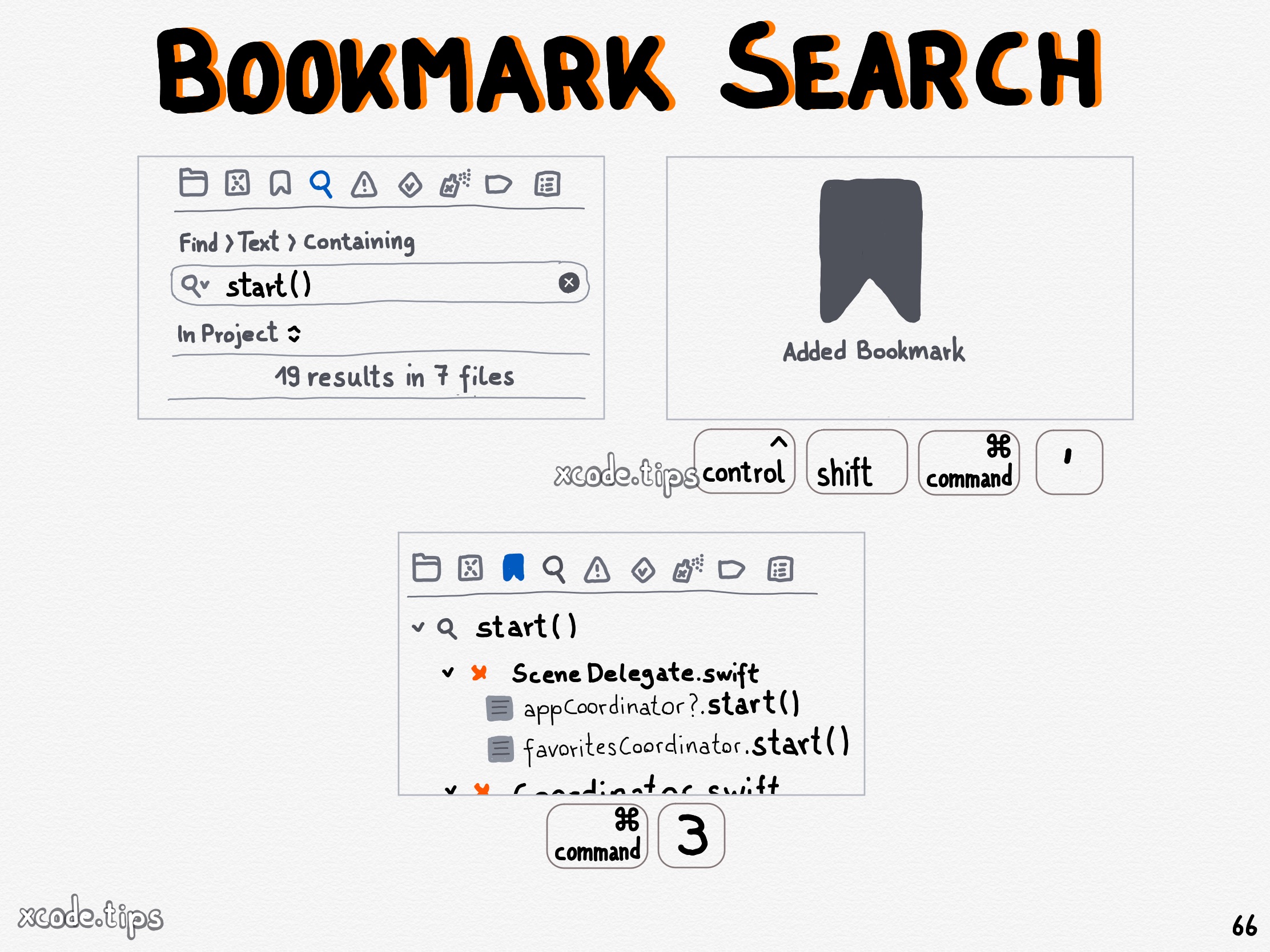
<p>Bookmark a project wide search using the shortcut Command Control Shift ‘.
The search bookmark is shown with your other bookmarks in the bookmark navigator.</p>]]></content><author><name>Dominik Hauser</name></author><category term="bookmark" /><category term="find" /><category term="search" /><summary type="html"><![CDATA[]]></summary><media:thumbnail xmlns:media="http://search.yahoo.com/mrss/" url="https://xcode.tips/assets/66_bookmark_search.jpg" /><media:content medium="image" url="https://xcode.tips/assets/66_bookmark_search.jpg" xmlns:media="http://search.yahoo.com/mrss/" /></entry><entry><title type="html">Select Next Occurrence</title><link href="https://xcode.tips/select-next-occurrence/" rel="alternate" type="text/html" title="Select Next Occurrence" /><published>2024-02-19T07:00:00+01:00</published><updated>2024-02-19T07:00:00+01:00</updated><id>https://xcode.tips/select-next-occurrence</id><content type="html" xml:base="https://xcode.tips/select-next-occurrence/"><![CDATA[<p><img src="../../../assets/65_select_next_occurrence.jpg" alt="" /></p>

<!--more-->

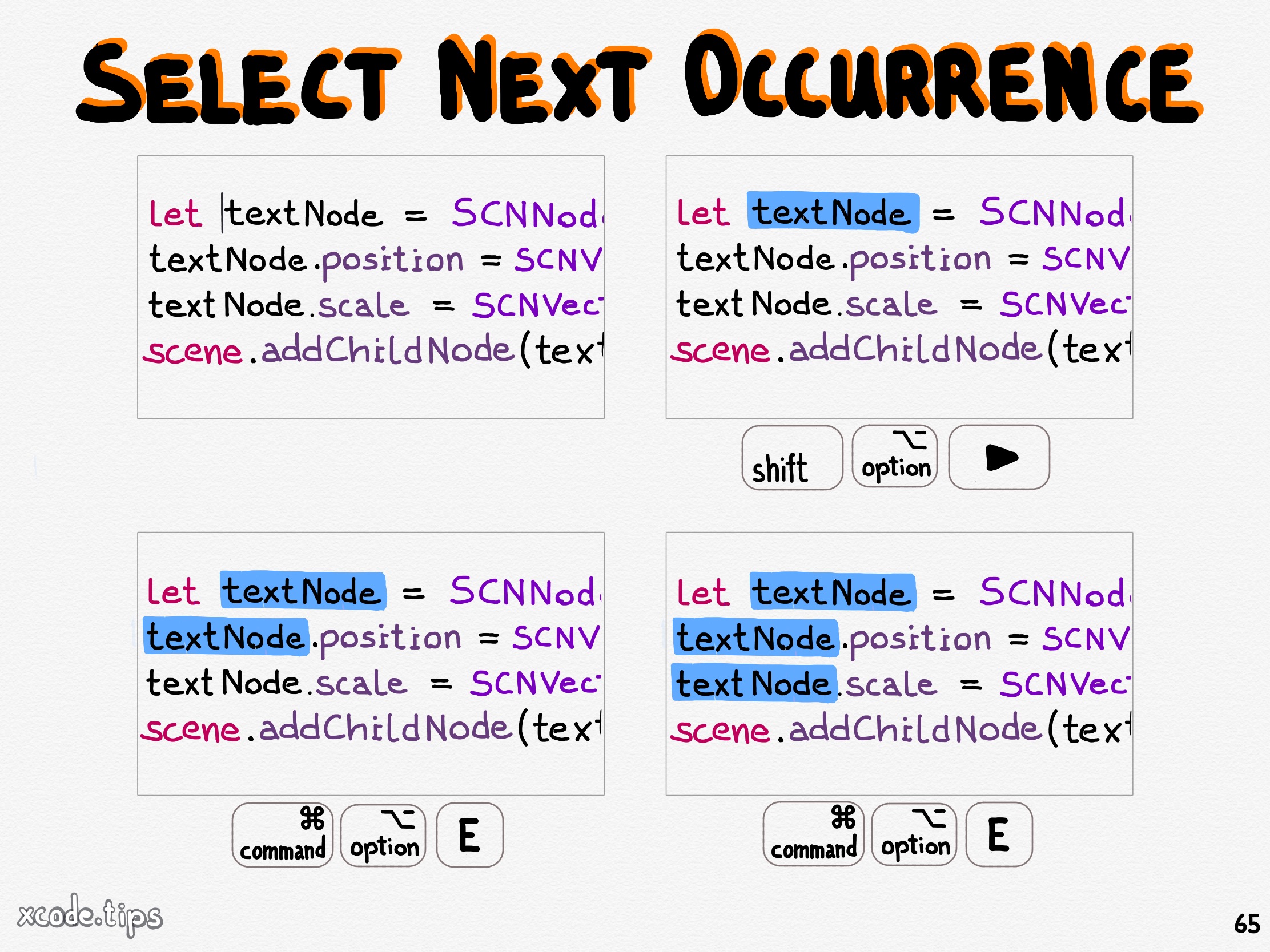
<p>Select some text and use the shortcut Command Option E to select the next occurrence of what you selected. Then you can start typing to change all selected occurences at once.</p>]]></content><author><name>Dominik Hauser</name></author><category term="editing" /><category term="select" /><category term="multi-cursor" /><summary type="html"><![CDATA[]]></summary><media:thumbnail xmlns:media="http://search.yahoo.com/mrss/" url="https://xcode.tips/assets/65_select_next_occurrence.jpg" /><media:content medium="image" url="https://xcode.tips/assets/65_select_next_occurrence.jpg" xmlns:media="http://search.yahoo.com/mrss/" /></entry><entry><title type="html">Mark Bookmark As Complete</title><link href="https://xcode.tips/mark-bookmark-as-complete/" rel="alternate" type="text/html" title="Mark Bookmark As Complete" /><published>2024-01-22T07:00:00+01:00</published><updated>2024-01-22T07:00:00+01:00</updated><id>https://xcode.tips/mark-bookmark-as-complete</id><content type="html" xml:base="https://xcode.tips/mark-bookmark-as-complete/"><![CDATA[<p><img src="../../../assets/64_mark_bookmark_as_complete.jpg" alt="" /></p>

<!--more-->

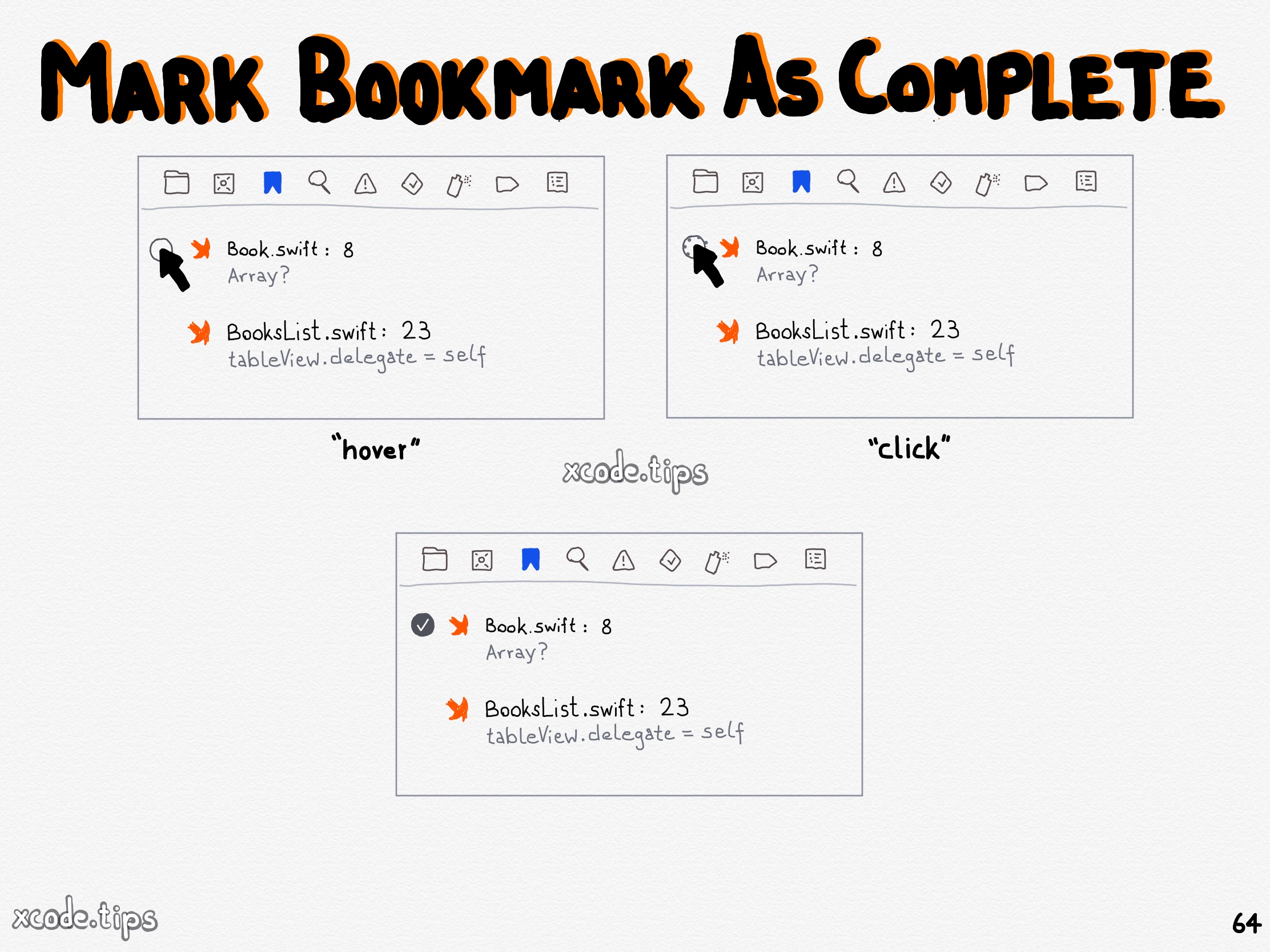
<p>Click left to a bookmark in the bookmark navigator to mark it as complete.</p>]]></content><author><name>Dominik Hauser</name></author><category term="bookmark" /><category term="find" /><category term="search" /><category term="organise" /><category term="to-do" /><summary type="html"><![CDATA[]]></summary><media:thumbnail xmlns:media="http://search.yahoo.com/mrss/" url="https://xcode.tips/assets/64_mark_bookmark_as_complete.jpg" /><media:content medium="image" url="https://xcode.tips/assets/64_mark_bookmark_as_complete.jpg" xmlns:media="http://search.yahoo.com/mrss/" /></entry><entry><title type="html">Quickly Open Bookmark</title><link href="https://xcode.tips/quickly-open-bookmark/" rel="alternate" type="text/html" title="Quickly Open Bookmark" /><published>2024-01-15T07:00:00+01:00</published><updated>2024-01-15T07:00:00+01:00</updated><id>https://xcode.tips/quickly-open-bookmark</id><content type="html" xml:base="https://xcode.tips/quickly-open-bookmark/"><![CDATA[<p><img src="../../../assets/63_quickly_open_bookmark.jpg" alt="" /></p>

<!--more-->

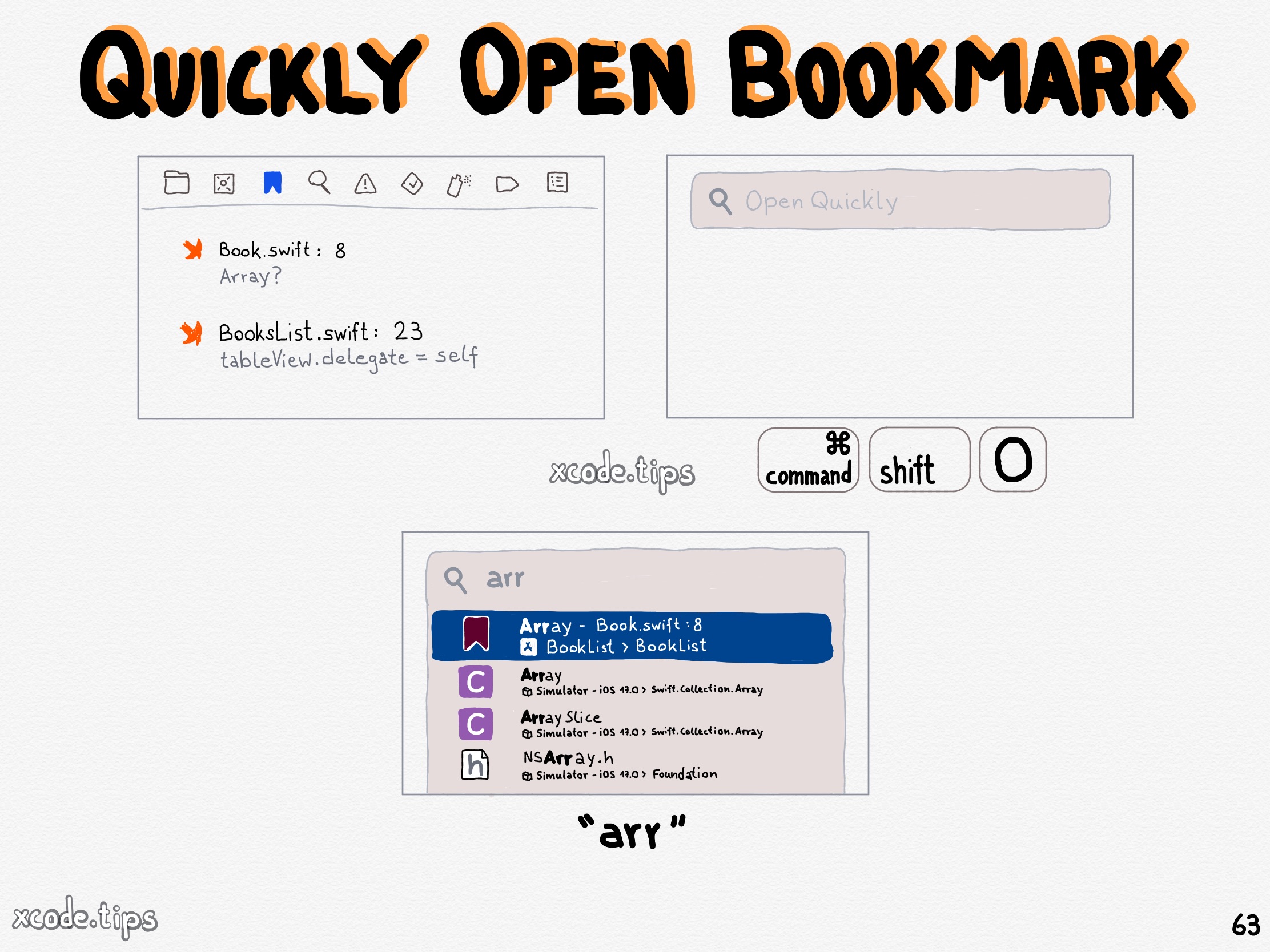
<p>The description of a bookmark appears in Open Quickly.</p>]]></content><author><name>Dominik Hauser</name></author><category term="bookmark" /><category term="find" /><category term="search" /><category term="organise" /><summary type="html"><![CDATA[]]></summary><media:thumbnail xmlns:media="http://search.yahoo.com/mrss/" url="https://xcode.tips/assets/63_quickly_open_bookmark.jpg" /><media:content medium="image" url="https://xcode.tips/assets/63_quickly_open_bookmark.jpg" xmlns:media="http://search.yahoo.com/mrss/" /></entry><entry><title type="html">Bookmark Description</title><link href="https://xcode.tips/bookmark-description/" rel="alternate" type="text/html" title="Bookmark Description" /><published>2023-11-28T07:00:00+01:00</published><updated>2023-11-28T07:00:00+01:00</updated><id>https://xcode.tips/bookmark-description</id><content type="html" xml:base="https://xcode.tips/bookmark-description/"><![CDATA[<p><img src="../../../assets/62_bookmark_description.jpg" alt="" /></p>

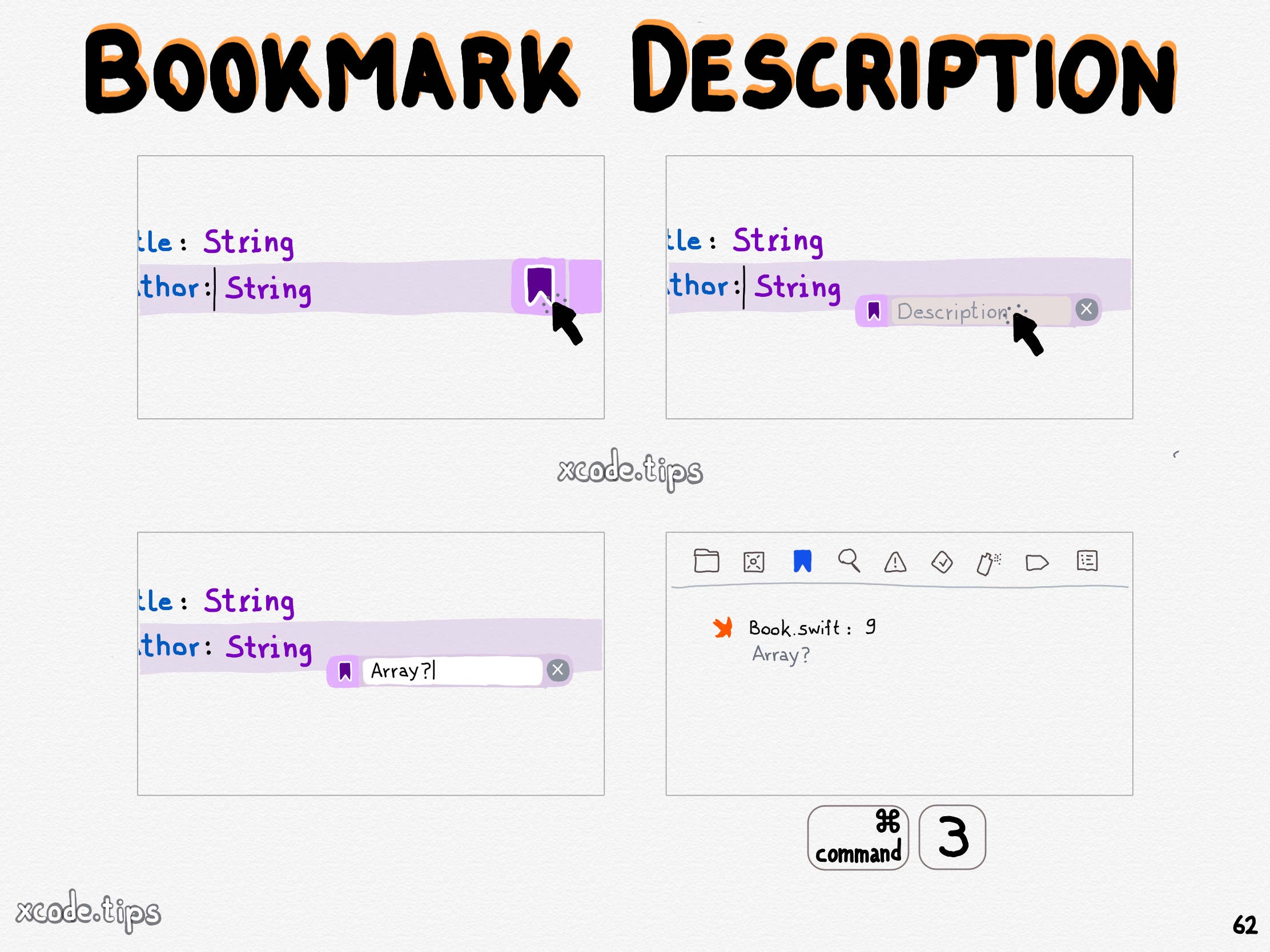
<!--more-->

<p>Click the bookmark icon of a bookmark to add a description for that bookmark. The description is shown in the bookmark navigator.</p>]]></content><author><name>Dominik Hauser</name></author><category term="bookmark" /><category term="find" /><category term="search" /><category term="organise" /><summary type="html"><![CDATA[]]></summary><media:thumbnail xmlns:media="http://search.yahoo.com/mrss/" url="https://xcode.tips/assets/62_bookmark_description.jpg" /><media:content medium="image" url="https://xcode.tips/assets/62_bookmark_description.jpg" xmlns:media="http://search.yahoo.com/mrss/" /></entry><entry><title type="html">Line Bookmark</title><link href="https://xcode.tips/line-bookmark/" rel="alternate" type="text/html" title="Line Bookmark" /><published>2023-10-24T08:00:00+02:00</published><updated>2023-10-24T08:00:00+02:00</updated><id>https://xcode.tips/line-bookmark</id><content type="html" xml:base="https://xcode.tips/line-bookmark/"><![CDATA[<p><img src="../../../assets/61_line_bookmark.jpg" alt="" /></p>

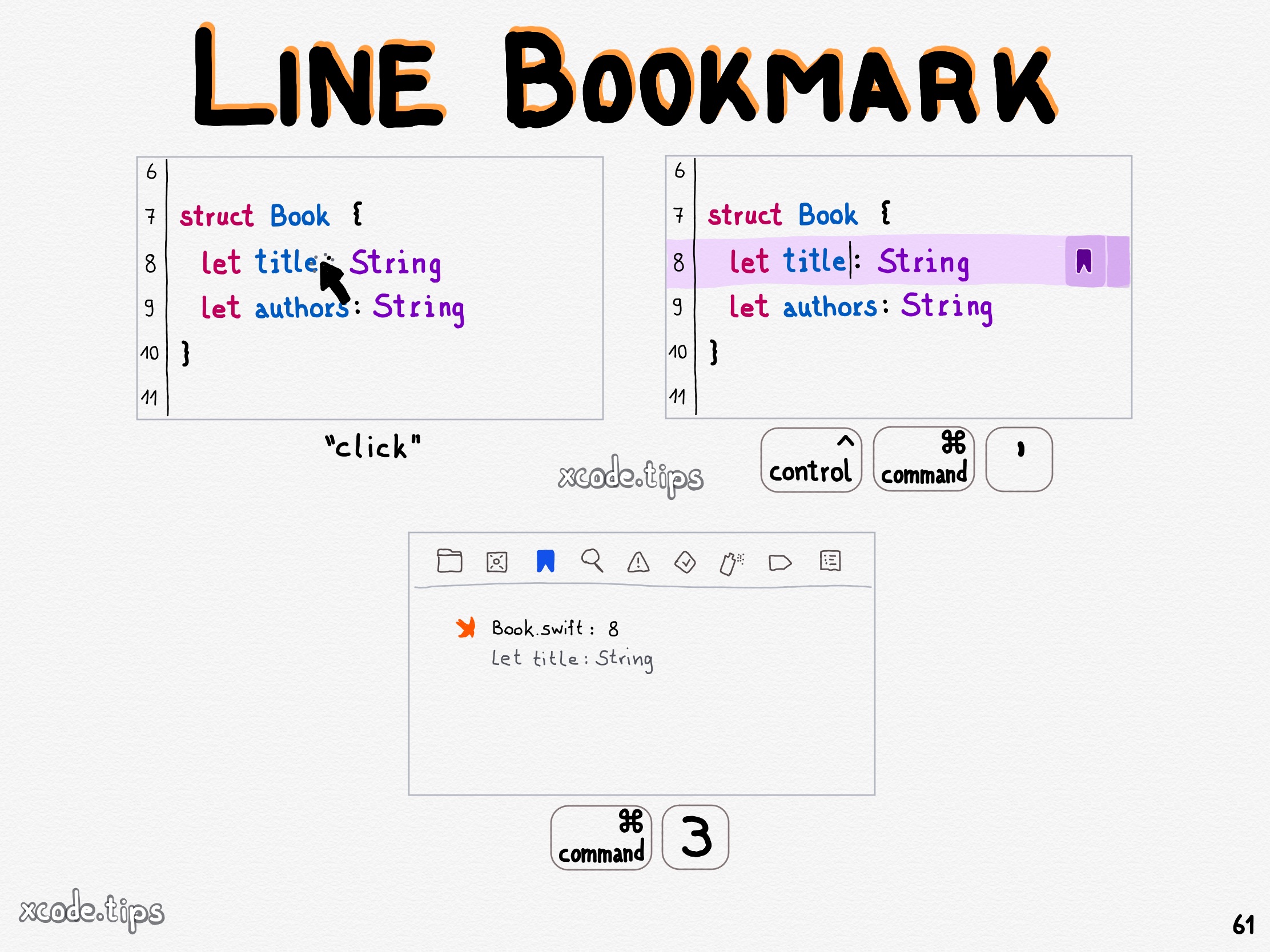
<!--more-->

<p>Navigate to a line and use the shortcut Control Command ‘ to add a bookmark to that line.</p>]]></content><author><name>Dominik Hauser</name></author><category term="bookmark" /><category term="find" /><category term="search" /><category term="organise" /><summary type="html"><![CDATA[]]></summary><media:thumbnail xmlns:media="http://search.yahoo.com/mrss/" url="https://xcode.tips/assets/61_line_bookmark.jpg" /><media:content medium="image" url="https://xcode.tips/assets/61_line_bookmark.jpg" xmlns:media="http://search.yahoo.com/mrss/" /></entry><entry><title type="html">Find Ancestor Types</title><link href="https://xcode.tips/find-ancestor-types/" rel="alternate" type="text/html" title="Find Ancestor Types" /><published>2023-10-16T08:00:00+02:00</published><updated>2023-10-16T08:00:00+02:00</updated><id>https://xcode.tips/find-ancestor-types</id><content type="html" xml:base="https://xcode.tips/find-ancestor-types/"><![CDATA[<p><img src="../../../assets/60_find_ancestor_types.jpg" alt="" /></p>

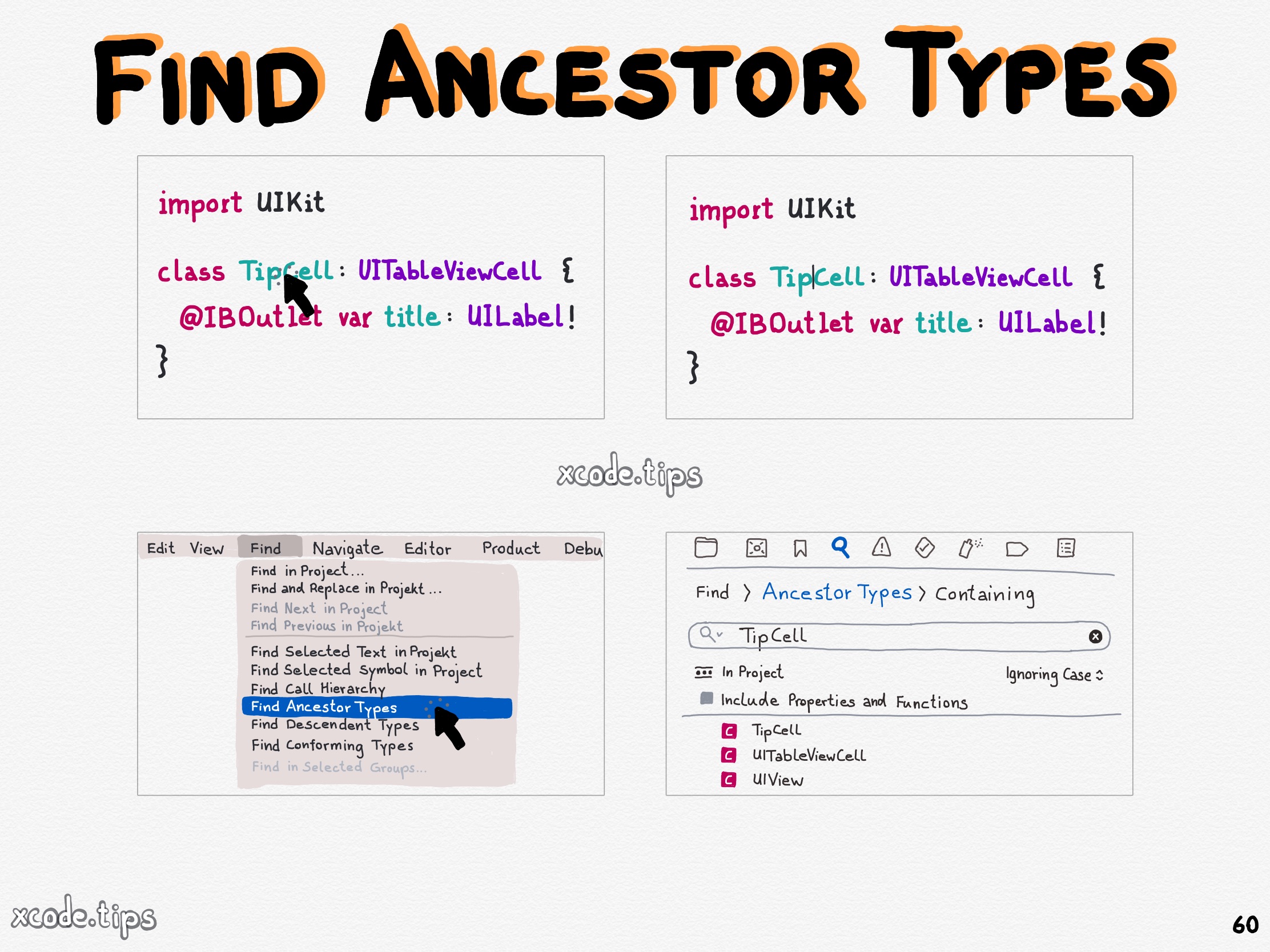
<!--more-->

<p>Click in the Find menu item on ‘Find Ancestor Types’ to find the ancestor types of the type unter the cursor.</p>]]></content><author><name>Dominik Hauser</name></author><category term="search" /><category term="find" /><category term="type" /><summary type="html"><![CDATA[]]></summary><media:thumbnail xmlns:media="http://search.yahoo.com/mrss/" url="https://xcode.tips/assets/60_find_ancestor_types.jpg" /><media:content medium="image" url="https://xcode.tips/assets/60_find_ancestor_types.jpg" xmlns:media="http://search.yahoo.com/mrss/" /></entry><entry><title type="html">Format to Multiple Lines</title><link href="https://xcode.tips/format-to-multiple-lines/" rel="alternate" type="text/html" title="Format to Multiple Lines" /><published>2023-10-09T08:00:00+02:00</published><updated>2023-10-09T08:00:00+02:00</updated><id>https://xcode.tips/format-to-multiple-lines</id><content type="html" xml:base="https://xcode.tips/format-to-multiple-lines/"><![CDATA[<p><img src="../../../assets/59_format_to_multiple_lines.jpg" alt="" /></p>

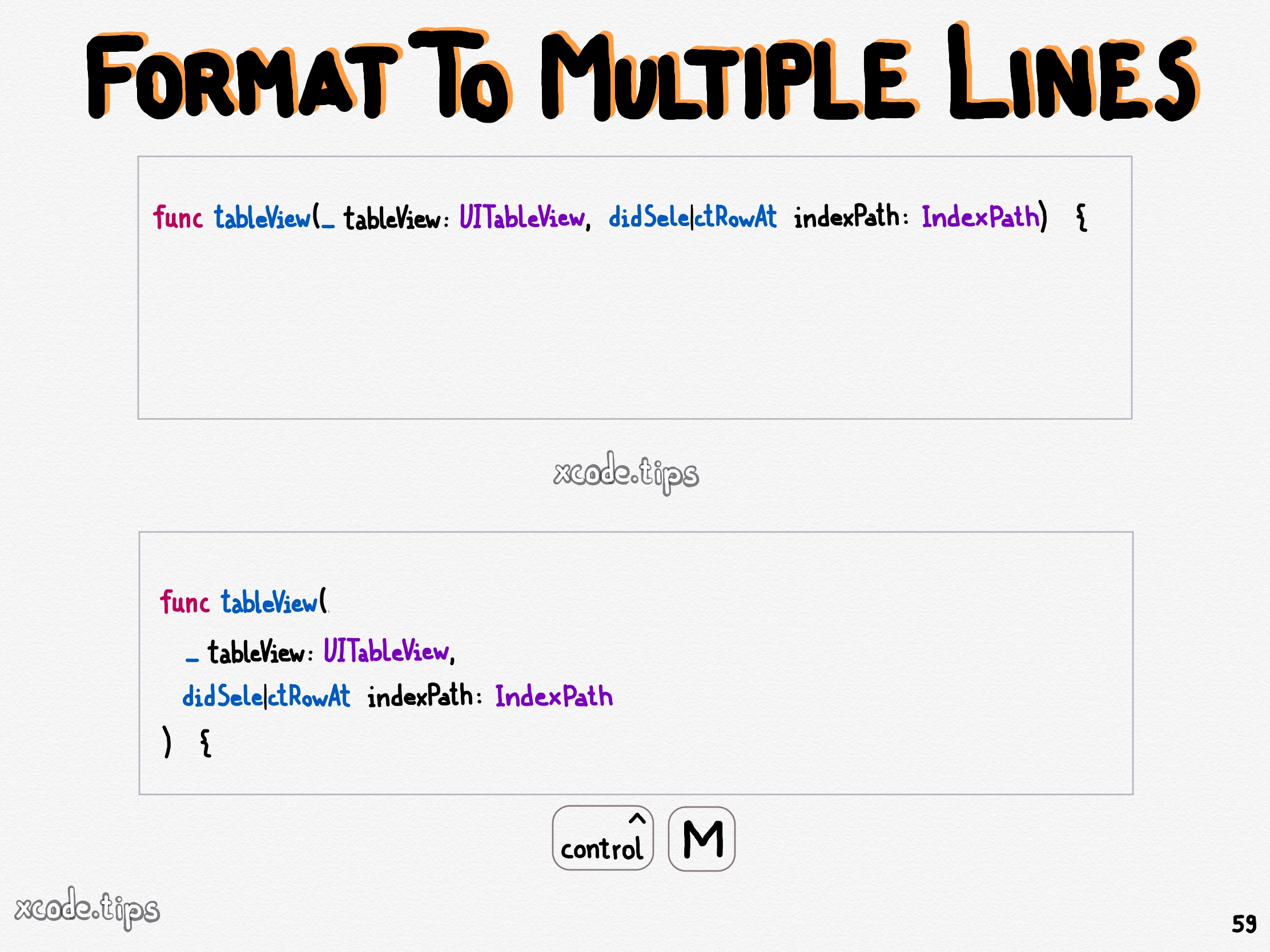
<!--more-->

<p>Use the shortcut Control M to format the line where the cursor is to multiple lines.</p>]]></content><author><name>Dominik Hauser</name></author><category term="editor" /><category term="editing" /><category term="lines" /><category term="fromating" /><summary type="html"><![CDATA[]]></summary><media:thumbnail xmlns:media="http://search.yahoo.com/mrss/" url="https://xcode.tips/assets/59_format_to_multiple_lines.jpg" /><media:content medium="image" url="https://xcode.tips/assets/59_format_to_multiple_lines.jpg" xmlns:media="http://search.yahoo.com/mrss/" /></entry><entry><title type="html">Quick Actions</title><link href="https://xcode.tips/quick-actions/" rel="alternate" type="text/html" title="Quick Actions" /><published>2023-10-03T08:00:00+02:00</published><updated>2023-10-03T08:00:00+02:00</updated><id>https://xcode.tips/quick-actions</id><content type="html" xml:base="https://xcode.tips/quick-actions/"><![CDATA[<p><img src="../../../assets/58_quick_actions.jpg" alt="" /></p>

<!--more-->

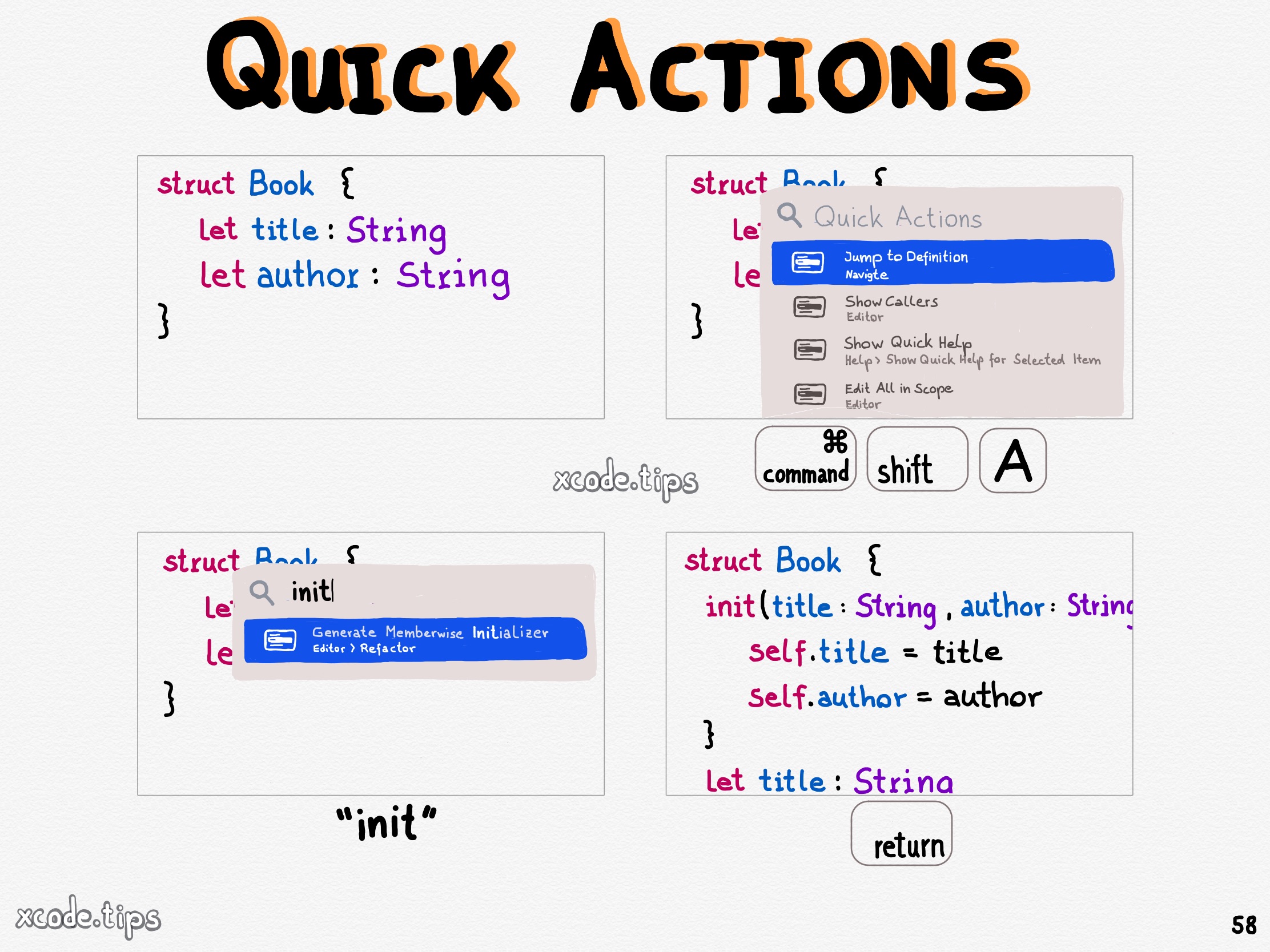
<p>Use the shortcut Command Shift A to open the quick actions window with many useful quick actions for your code.</p>]]></content><author><name>Dominik Hauser</name></author><category term="editor" /><category term="editing" /><category term="actions" /><category term="helper" /><summary type="html"><![CDATA[]]></summary><media:thumbnail xmlns:media="http://search.yahoo.com/mrss/" url="https://xcode.tips/assets/58_quick_actions.jpg" /><media:content medium="image" url="https://xcode.tips/assets/58_quick_actions.jpg" xmlns:media="http://search.yahoo.com/mrss/" /></entry></feed>